KHQRPay API
A small REST API over HTTPS with JSON bodies. You create a payment, show the customer its KHQR, and we tell your server when it’s paid. Money goes straight from the customer’s bank to your ABA account. KHQRPay never holds it.
Using an AI coding assistant? Copy prompt for AI copies this API as a brief with numbered requirements, ready to paste into your assistant.
- Sign in with Google and create a store. You can leave the ABA payment link empty while you build in test mode.
- Under API keys, create a test key (
kp_test_). Under Webhooks, add a Test endpoint for your server. - Create a payment from your server and send the customer to its
checkout_url. - Simulate
paidfrom the dashboard or the API, and fulfil the order whenpayment.completedarrives. - To take real money, connect your ABA payment link, then create a live key and a Live endpoint. See Going live.
In the dashboard’s Payments page, the Live/Test switch controls the list and the create action follows that choice. The dialog shows a read-only mode badge for confirmation; change the page’s Live/Test selection before opening the dialog when you need to create the other kind of payment.
Send your secret key as a bearer token on every request. Each key belongs to one store and one mode: kp_live_ keys create real KHQRs on your ABA link, and kp_test_ keys create simulated ones. After the prefix come 32 letters, digits, - or _. Keys are shown once and stored only as a SHA-256 hash. Keep them on your server, never in browser or mobile app code.
Authorization: Bearer kp_live_xxxxxxxxxxxxxxxxxxxxxxxxxxxxxxxxWithout the header you get 401 unauthorized with “Missing bearer token”. A wrong or revoked key gets “Invalid API key”. You can create a live key only after the store’s ABA payment link is connected. A store can have up to 10 active keys in each mode; revoke one you no longer use to make room.
POST /v1/payments returns 201 Created with the payment object, or 200 when an idempotency key replays an earlier request.
| Parameter | Type | Description |
|---|---|---|
amount | number | string | Required: USD amounts use up to 2 decimals; KHR amounts must be whole riel. The minimum is 0.01 USD or 1 KHR. |
currency | string | USD or KHR, case-insensitive; defaults to USD. Live requests are converted to the connected ABA link's settlement currency when needed. |
reference_id | string | Your order id as a string, up to 255 characters. Send a numeric id as a string ("2048"): a number returns invalid_request. Echoed in webhooks and redirects. |
metadata | object | Any JSON object: up to 1,000 keys, 1 MB and 8 levels deep. Returned as-is. |
idempotency_key | string | Up to 255 characters, or send the Idempotency-Key header, which wins if you send both. Spaces around a key are ignored, and a blank key counts as none. See Idempotency below. |
curl https://khqrpay.dev/v1/payments \
-H "Authorization: Bearer $KHQRPAY_SECRET_KEY" \
-H "Content-Type: application/json" \
-H "Idempotency-Key: INV-2048-attempt-1" \
-d '{"amount": 16.88, "currency": "USD", "reference_id": "INV-2048"}'Idempotency
- Send an
Idempotency-Keywith every create. Keys belong to the store and the mode, and last 24 hours. - A key can be up to 255 characters; a longer one returns
400 invalid_request. Spaces around a key are ignored, and an empty or blank header counts as no key, so the request isn’t idempotent unless the body has anidempotency_key. - The same key with the same amount, currency and reference_id returns the original payment with
200, even if it has expired since. Metadata isn’t compared. - The same key with a different amount, currency or reference_id returns
400 idempotency_conflict. - So use one key per checkout attempt, like
INV-2048-attempt-1, never just the order id: a customer who tries again after the QR expired needs a new payment.
Create, retrieve and list return every field below. Webhooks carry a subset in data.payment: id, status, amount, currency, reference_id, metadata and approved_at, plus late on late payments.
{
  "id": "pFQ3xV8aN2rL7kTm9sB4cWd6hJ1yZ0eU",
  "object": "payment",
  "livemode": true,
  "status": "pending",
  "amount": "16.88",
  "currency": "USD",
  "requested_amount": null,
  "requested_currency": null,
  "settlement_amount": "16.88",
  "settlement_currency": "USD",
  "conversion_rate": null,
  "reference_id": "INV-2048",
  "metadata": {
    "cart_id": "cart_7Hq2",
    "customer": "Sokha"
  },
  "qr_string": "000201010212…630494E5",
  "checkout_url": "https://khqrpay.dev/pay/pFQ3xV8aN2rL7kTm9sB4cWd6hJ1yZ0eU",
  "approved_at": null,
  "scanned_at": null,
  "created_at": "2026-10-23T02:14:09.000Z",
  "expires_at": "2026-10-23T02:17:09.000Z"
}| Field | Type | Description |
|---|---|---|
id | string | 32-character payment id, used in checkout_url and GET /v1/payments/:id |
object | string | Always "payment" |
livemode | boolean | true for payments made with a kp_live_ key, false for test payments |
status | string | pending, scanned, paid, expired or failed (see below) |
amount | string | Decimal string with 2 decimals ("16.88") |
currency | string | "USD" or "KHR" |
reference_id | string | null | Your order id, as sent |
metadata | object | null | Your metadata, as sent |
qr_string | string | The KHQR (EMVCo) payload. Render it at error-correction level H |
checkout_url | string | The hosted checkout page for this payment |
approved_at | string | null | When the bank approved the payment (ISO 8601) |
scanned_at | string | null | When the customer scanned the QR |
created_at | string | When the payment was created |
expires_at | string | When the QR stops being offered. Live: about 3 minutes after creation (ABA’s checkout session), and a scan moves it to at least 2 minutes after the scan. Test: 5 minutes. Re-read it; don’t hard-code a duration |
| Status | Final | Meaning |
|---|---|---|
pending | No | QR created, waiting for the customer to scan |
scanned | No | Scanned; the customer is confirming in their bank app. Not paid yet. expires_at moves to at least 2 minutes after the scan |
paid | Yes | The bank approved the payment and the money is in your ABA account. Counts toward your plan. Fires payment.completed |
expired | Usually | Not paid in time, which includes a payment the customer declined or cancelled in their bank app. A live payment turns expired about 30 s after expires_at, a test payment within about 15 s. A late bank approval can still move it to paid |
failed | Yes | Rare: we had to stop checking the payment because of an error on our side. Never a decline: a declined or cancelled payment ends as expired. In test mode, only Simulate sets it |
GET /v1/payments/:id returns the payment object with every field. If you don’t use webhooks, poll it from your server every few seconds at most, and stop at a final status.
curl https://khqrpay.dev/v1/payments/pFQ3xV8aN2rL7kTm9sB4cWd6hJ1yZ0eU \
-H "Authorization: Bearer $KHQRPAY_SECRET_KEY"| Parameter | In | Description |
|---|---|---|
id | path | The payment’s id. A payment of another store, or of the other mode (a test key asking for a live payment), returns 404 payment_not_found |
GET /v1/payments returns the store’s payments in the key’s mode, newest first.
curl "https://khqrpay.dev/v1/payments?status=paid&limit=20" \
-H "Authorization: Bearer $KHQRPAY_SECRET_KEY"| Parameter | In | Description |
|---|---|---|
status | query | Optional: pending, scanned, paid, expired or failed. Anything else returns 400 invalid_status |
limit | query | Optional: 1 to 100. Default 20 |
{
  "object": "list",
  "data": [
    {
      "id": "pFQ3xV8aN2rL7kTm9sB4cWd6hJ1yZ0eU",
      "object": "payment",
      "livemode": true,
      "status": "paid",
      "amount": "16.88",
      "currency": "USD",
      "requested_amount": null,
      "requested_currency": null,
      "settlement_amount": "16.88",
      "settlement_currency": "USD",
      "conversion_rate": null,
      "reference_id": "INV-2048",
      "metadata": {
        "cart_id": "cart_7Hq2",
        "customer": "Sokha"
      },
      "qr_string": "000201010212…630494E5",
      "checkout_url": "https://khqrpay.dev/pay/pFQ3xV8aN2rL7kTm9sB4cWd6hJ1yZ0eU",
      "approved_at": "2026-10-23T02:14:38.000Z",
      "scanned_at": "2026-10-23T02:14:31.000Z",
      "created_at": "2026-10-23T02:14:09.000Z",
      "expires_at": "2026-10-23T02:17:09.000Z"
    }
  ]
}
There’s no pagination cursor yet, so you can read at most the 100 newest payments. Track older ones through webhooks or by id.
GET /v1/usage returns your plan quota: the same numbers that decide whether a live create is accepted. The quota belongs to your account, so every store and every key sees the same figures.
curl https://khqrpay.dev/v1/usage \
-H "Authorization: Bearer $KHQRPAY_SECRET_KEY"{
"plan": "starter",
"limit": 1500,
"used": 284,
"remaining": 1216,
"period_start": "2026-10-10T02:14:09.000Z",
"period_end": "2026-11-09T02:14:09.000Z"
}| Field | Type | Description |
|---|---|---|
plan | string | The plan in effect now: free, starter, pro, scale or enterprise |
limit | number | Paid live transactions allowed this period, including any carried over |
used | number | Paid live transactions so far this period. Test payments never count |
remaining | number | limit minus used, never below 0. At 0, live creates return 402 quota_exceeded |
period_start | string | Start of the current 30-day period (ISO 8601) |
period_end | string | End of the period, when used goes back to 0 |
- Periods last 30 days from when you paid for your plan, not calendar months. On Free, a period starts at sign-up, or at your first dashboard visit, usage check or live create after the last period ended.
- Carry-over: pay for a plan while a paid plan is still active, and its unused transactions move into the new period’s
limit. - Lapse: if a paid period ends without a renewal, the account drops to Free (100 paid transactions per 30 days) for a fresh period, and any carry-over is lost.
- Limit reached: live creates return
402 quota_exceededuntil you upgrade or the period ends. Test payments keep working.
checkout_url opens a mobile-first page in Khmer or English (your store’s default, with a toggle). It shows your logo and brand colour, your store’s name on the KHQR card, the amount, a countdown, live status, your support email and, on phones, an “Open ABA Mobile” button. At 0:00 the QR disappears while we check with the bank for a last-second payment. Every page is served with HSTS and a Content-Security-Policy, and can’t be framed (X-Frame-Options: DENY), so link or redirect to the checkout rather than embedding it.
Redirects
Set success and failure URLs (https only) in Store settings. After a final status the page shows a Continue link and, 2.5 seconds later, sends the customer to your URL with status (success or failed), payment_id and reference_id appended:
https://shop.example.com/thanks?status=success&payment_id=pFQ3xV8aN2rL7kTm9sB4cWd6hJ1yZ0eU&reference_id=INV-2048Treat the redirect as a hint, and confirm with the webhook or GET /v1/payments/:id before you fulfil. A customer sent to your failure URL can still pay late, so expect a later payment.completed. Without a failure URL, an expired page keeps listening for a late approval for 30 minutes and switches to paid if the bank confirms.
Your own payment screen
Render qr_string at error-correction level H on white with a quiet zone, show the amount, and count down to expires_at, reading it again after a scan because it moves. Hide the QR at 0:00. Poll your own backend, never our API from the browser. Or use the ready-made card below.
GET /api/render/khqr/<percent-encoded qr_string>.svg returns a ready-made KHQR card for any valid KHQR, not only KHQRPay’s. It needs no API key, so it works in an <img>, an email or an invoice.
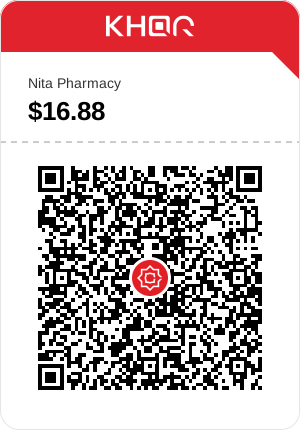
| Property | Value |
|---|---|
| Size | 300 × 430 SVG: red KHQR header, payee, amount and the QR at error-correction level H |
| Payee name | The bank account holder’s name from the QR (tag 59). The hosted checkout prints your store’s name instead |
Content-Type | image/svg+xml; charset=utf-8 |
Cache-Control | public, max-age=31536000, immutable: the same string always gives the same image |
Access-Control-Allow-Origin | * |
Content-Security-Policy | default-src 'none'; style-src 'unsafe-inline'; img-src data: |
| Rate limit | 120 renders per minute per IP. Repeats served from a CDN or browser cache don’t count. Over it: 429 rate_limited with Retry-After |
| Errors | 400 invalid_khqr: bad percent-encoding, bad CRC, malformed TLV, missing required tags or over 512 characters |
const src = `https://khqrpay.dev/api/render/khqr/${encodeURIComponent(payment.qr_string)}.svg`;<img src="https://khqrpay.dev/api/render/khqr/00020101021229210017khqrpay_test%40test520459995303840540516.885802KH5913Nita%20Pharmacy6010Phnom%20Penh62360120pFQ3xV8aN2rL7kTm9sB40708TESTMODE630494E5.svg"
alt="KHQR: pay $16.88 to Nita Pharmacy" width="300" height="430">Add endpoints under Webhooks. Each endpoint has a mode: live endpoints receive events for live payments only, and test endpoints for test payments only. A new endpoint subscribes to all four events; Edit events changes that later and keeps the signing secret. When a payment changes status, we POST the event to every enabled endpoint of the payment’s mode that subscribes to it.
Endpoint URLs must use https and resolve to public internet addresses. We refuse private and internal addresses, such as localhost, 10.x.x.x or 192.168.x.x (a KHQRPay server in local development accepts them). To receive events on your own machine, use an HTTPS tunnel.
| Event | When |
|---|---|
payment.completed | The payment is paid, including late approvals (late: true). Fulfil the order here |
payment.scanned | The customer scanned the QR. Not paid yet, and expires_at has moved |
payment.expired | Not paid in time, which includes a declined or cancelled payment. Usually final, but see Late payments |
payment.failed | Rare: we had to stop checking the payment because of an error on our side, or you simulated failed in test mode. Never sent for a decline |
POST /webhooks/khqrpay HTTP/1.1
Content-Type: application/json
User-Agent: KHQRPay-Webhooks/1.0
X-KHQRPay-Event: payment.completed
X-KHQRPay-Signature: t=1792721679,v1=9db81bff0b67dce772f19532d19aa2403bc263e756bb22d0966384e591afac00
X-KHQRPay-Delivery: c3a8f0d2-61b7-4e95-8d2a-7f4b9e0c1a36

{
  "id": "5b1e9c2a-7d4f-4e8b-9a3c-2f6d8e1b0c47",
  "type": "payment.completed",
  "livemode": true,
  "created": "2026-10-23T02:14:38.000Z",
  "data": {
    "payment": {
      "id": "pFQ3xV8aN2rL7kTm9sB4cWd6hJ1yZ0eU",
      "status": "paid",
      "amount": "16.88",
      "currency": "USD",
      "requested_amount": null,
      "requested_currency": null,
      "settlement_amount": "16.88",
      "settlement_currency": "USD",
      "conversion_rate": null,
      "reference_id": "INV-2048",
      "metadata": {
        "cart_id": "cart_7Hq2",
        "customer": "Sokha"
      },
      "approved_at": "2026-10-23T02:14:38.000Z"
    }
  }
}| Field | Description |
|---|---|
id | The event id. Every endpoint and every retry of the event gets the same id: deduplicate on it |
type | One of the four events, also sent as X-KHQRPay-Event |
livemode | false for test payments and Send test events |
created | When the event happened (ISO 8601) |
data.payment | id, status, amount, currency, reference_id, metadata and approved_at, plus late: true on late payments |
test | true on events sent with Send test, absent otherwise |
Delivery and retries
- Reply with any 2xx within 10 seconds. A timeout, a network error, a redirect (3xx; we don’t follow it) or any other status counts as a failure.
- A delivery gets up to 9 attempts: the first, then retries 1 m, 5 m, 15 m, 30 m, 1 h, 2 h, 4 h and 8 h apart, about 16 hours in total. Every attempt is signed afresh, so the 5-minute timestamp check still passes.
- Events may arrive out of order or more than once. Deduplicate on the event
id, make fulfilment idempotent, and check the payment’s current status before acting on an older event. - Pausing an endpoint stops it: retries still queued are marked failed (“Not sent: the endpoint is paused”), and events that happen while it’s paused are never queued. After you turn it back on, use Retry failed for the stopped retries and
GET /v1/paymentsto catch up on the rest. - Use delivery logs to investigate recent attempts; keep your own records if you need a durable audit history.
X-KHQRPay-Signature is t=<unix seconds>,v1=<hex>, where v1 is the HMAC-SHA256 of `${t}.${rawBody}` keyed with the endpoint’s signing secret. Secrets are whsec_ followed by base64url characters, so they can contain - and _. Verify the raw body before you parse it, compare in constant time, and reject timestamps more than 5 minutes away from your clock.
Each handler below returns 400 for a missing or bad signature, acknowledges test events without fulfilling them, deduplicates on the event id and fulfils only on payment.completed. saveEventOnce is your code: insert the event id into a table with a unique key (INSERT … ON CONFLICT DO NOTHING) and fulfil new rows in a background job, as the Laravel tab does with insertOrIgnore. Make fulfilment idempotent per order too.
import crypto from "node:crypto";
import express from "express";
import { saveEventOnce } from "./orders.js"; // your code: INSERT … ON CONFLICT (event_id) DO NOTHING

const app = express();

function verifyKhqrPay(rawBody, header, secret, toleranceSec = 300) {
  const h = String(header ?? "");
  const t = /(?:^|,)\s*t=(\d{1,12})\s*(?=,|$)/.exec(h)?.[1];
  const v1 = /(?:^|,)\s*v1=([0-9a-fA-F]{64})\s*(?=,|$)/.exec(h)?.[1];
  if (!t || !v1 || Math.abs(Date.now() / 1000 - Number(t)) > toleranceSec) return false;
  const expected = crypto.createHmac("sha256", secret).update(`${t}.${rawBody}`).digest();
  const given = Buffer.from(v1, "hex");
  return given.length === expected.length && crypto.timingSafeEqual(given, expected);
}

// express.raw keeps the exact bytes the signature covers. Register this route before
// app.use(express.json()), or the JSON parser reads the body first and every check fails.
// Keep the limit: large metadata can push an event past express.raw's 100 kb default.
app.post("/webhooks/khqrpay", express.raw({ type: "application/json", limit: "5mb" }), async (req, res) => {
  const raw = Buffer.isBuffer(req.body) ? req.body.toString("utf8") : ""; // not a Buffer unless the body is JSON
  if (!verifyKhqrPay(raw, req.get("X-KHQRPay-Signature") ?? "", process.env.KHQRPAY_WEBHOOK_SECRET)) {
    return res.status(400).send("Invalid signature");
  }
  const event = JSON.parse(raw);

  // Send-test events and test-mode payments: acknowledge, never fulfil.
  if (event.test === true || event.livemode !== true) return res.sendStatus(200);

  if (event.type === "payment.completed") {
    // Paid. Also when data.payment.late is true: the bank approved after payment.expired.
    // Every retry and every endpoint repeats event.id, so store it under a unique key
    // and fulfil the order in a background job, not in this request.
    await saveEventOnce(event.id, event.data.payment);
  }
  // payment.expired isn't always final: don't cancel anything you can't undo.
  res.sendStatus(200); // within 10 seconds
});

app.listen(3000);
On a staging server wired to a test endpoint, you can drop the livemode check to run your fulfilment code on simulated payments. Keep it in production.
Since 22 Oct 2026 an ABA QR stays payable at the bank for 30 minutes after it was created (the QR’s own expiry, KHQR tag 99), longer than the checkout session behind expires_at. So after a live payment expires, we keep checking it until the QR’s own expiry: at least 10 and at most 60 minutes after expires_at.
If the bank approves in that window, the payment moves from expired to paid, you get payment.completed after payment.expired, and data.payment.late is true:
{
  "id": "9e4d71c3-7d4f-4e8b-9a3c-2f6d8e1b0c47",
  "type": "payment.completed",
  "livemode": true,
  "created": "2026-10-23T02:23:21.000Z",
  "data": {
    "payment": {
      "id": "pFQ3xV8aN2rL7kTm9sB4cWd6hJ1yZ0eU",
      "status": "paid",
      "amount": "16.88",
      "currency": "USD",
      "requested_amount": null,
      "requested_currency": null,
      "settlement_amount": "16.88",
      "settlement_currency": "USD",
      "conversion_rate": null,
      "reference_id": "INV-2048",
      "metadata": {
        "cart_id": "cart_7Hq2",
        "customer": "Sokha"
      },
      "approved_at": "2026-10-23T02:23:21.000Z",
      "late": true
    }
  }
}- The money arrived: fulfil the order, even if your checkout already said the payment expired.
- Don’t treat
expiredas final for anything you can’t undo (cancelling the order, releasing a one-off item, refunding) until an hour afterexpires_at. - Deduplicate on the event
id, not the payment id: a handler that skips events for a payment it has already seen drops this one. - Try it in test mode: simulate
expired, thenpaid.
We haven’t yet seen ABA report an approval for a real payment made after its 3-minute session, so the late watch is designed to catch these payments, not guaranteed to.
Each endpoint under Webhooks has these tools. Recent deliveries logs every delivery with its time, attempt number, endpoint and HTTP status, plus the start of your response when an attempt failed. It lists the newest first and pages back through older deliveries.
| Action | What it does |
|---|---|
| Send test | Sends the event you pick right away and shows your endpoint’s HTTP answer. The payment is made up (id pay_test_…, reference_id test_order, $1.00, status matching the event), livemode is false and the body has "test": true. Logged, never retried |
| Retry now | On a delivery still backing off (“retrying · next attempt …”): sends the next attempt immediately |
| Resend | On a finished delivery, succeeded or failed: sends the same event again, with the same event id and a fresh signature. A Send-test delivery is sent once more and never retried |
| Retry failed (last 24 h) | Queues every failed delivery of the endpoint from the last 24 hours again, for example after an outage or a pause. Send-test events aren’t included |
{
  "id": "1f7c2e94-7d4f-4e8b-9a3c-2f6d8e1b0c47",
  "type": "payment.completed",
  "livemode": false,
  "created": "2026-10-23T02:14:09.000Z",
  "data": {
    "payment": {
      "id": "pay_test_9sB4cWd6hJ1yZ0eU",
      "status": "paid",
      "amount": "1.00",
      "currency": "USD",
      "reference_id": "test_order",
      "metadata": null,
      "approved_at": "2026-10-23T02:14:09.000Z"
    }
  },
  "test": true
}| Header | Value |
|---|---|
Content-Type | application/json |
User-Agent | KHQRPay-Webhooks/1.0 |
X-KHQRPay-Event | The event type, same as type in the body |
X-KHQRPay-Signature | t=<unix seconds>,v1=<hex HMAC-SHA256>, signed afresh on every attempt, resends included |
X-KHQRPay-Delivery | The delivery’s id (one event to one endpoint). Its retries and resends repeat it; each Send test gets a new one. Quote it to support, but deduplicate on the body’s id |
To run the whole flow, fulfilment code included, create payments with a kp_test_ key and simulate them: their events reach your test endpoints, signed like live ones.
- Requests with a
kp_test_key never contact the bank, never count toward your quota and need no ABA link. They keep working while the store’s live payments are paused. - The QR is a well-formed KHQR that banks won’t pay, and the hosted checkout shows a test banner.
- Test payments last 5 minutes and turn expired within about 15 seconds of
expires_at. - Their events go to test endpoints only, with
livemode: false. - Idempotency keys are per mode, so a test key never replays a live payment.
Move a test payment through its lifecycle with Simulate on its page in the dashboard, or with POST /v1/test/payments/:id/simulate and a status of scanned, paid, expired or failed. The response is the updated payment. A live key gets 400 invalid_request, and a live or unknown payment id 404 payment_not_found.
curl https://khqrpay.dev/v1/test/payments/pFQ3xV8aN2rL7kTm9sB4cWd6hJ1yZ0eU/simulate \
-H "Authorization: Bearer $KHQRPAY_TEST_KEY" \
-H "Content-Type: application/json" \
-d '{"status": "paid"}'To test a late payment, simulate expired and then paid (in the dashboard, Simulate late approval): you get payment.completed with late: true. Simulating a status the payment can’t move to, such as paid after failed, changes nothing.
- In the ABA Merchant app, create a Payment Link in KHR or USD with an open amount, then connect it in Store settings. You can create live keys only after that.
- Create a
kp_live_key and a Live webhook endpoint, and give your server the new endpoint’s signing secret. - Make a real $0.01 payment from end to end before you open to customers.
- Pausing. Pausing the store in Store settings stops live payments only: live creates return
400 payment_link_disabled(“The store’s payments are paused. Turn them back on in Store settings.”). Test payments keep working. - The ABA rail. KHQRPay drives your ABA payment link through ABA’s own web checkout, not an official API, and ABA can change it at any time. On 22 Oct 2026 ABA moved that checkout API from pwapp.ababank.com to link.payway.com.kh/api and renamed variables in the link page; KHQRPay was updated the same night. If live creates fail with
payment_provider_error, retry with the same Idempotency-Key, and contact support if it continues.
Errors return an HTTP status and a JSON body with a machine-readable error code and a human-readable message. Branch on error: codes are stable, but message text can change at any time. Every /v1 response is JSON, including 404 not_found for an unknown path and 405 method_not_allowed (with an Allow header) for a wrong method.
{ "error": "amount_too_low", "message": "Minimum amount is 0.01 USD" }| Code | HTTP | When |
|---|---|---|
invalid_request | 400 | The body isn’t valid JSON, a field failed validation (the message names it), or the Idempotency-Key header is over 255 characters |
invalid_amount | 400 | amount isn’t a number (for example "abc") or has more than 2 decimals |
amount_too_low | 400 | amount is below 0.01 USD or 1 KHR |
amount_too_high | 400 | Above your ABA link’s maximum |
idempotency_conflict | 400 | Idempotency-Key reused within 24 h with different requested or settlement details, or a different reference_id |
invalid_status | 400 | Unknown status in the list filter |
invalid_cursor | 400 | The payment list cursor is malformed or expired |
payment_link_disabled | 400 | The store’s live payments are paused, or ABA disabled its payment link |
invalid_khqr | 400 | The QR image endpoint got a malformed payload or a bad CRC |
account_blocked | 403 | Account access is suspended; contact support |
api_key_blocked | 403 | API key blocked after sustained excessive traffic; contact support |
unauthorized | 401 | Missing bearer token, or an invalid or revoked API key |
quota_exceeded | 402 | Your plan’s paid-transaction limit for this period is reached (live payments only) |
not_found | 404 | No such /v1 endpoint |
payment_link_not_found | 404 | No ABA payment link is connected to the store (live payments) |
payment_not_found | 404 | No such payment for this store and mode |
method_not_allowed | 405 | Wrong HTTP method for the endpoint. The Allow header lists the right ones |
payload_too_large | 413 | Body over 5 MB |
rate_limited | 429 | Too many requests. Wait Retry-After seconds, then retry |
internal_error | 500 | Something broke on our side. Safe to retry with the same Idempotency-Key |
payment_provider_error | 502 | ABA’s checkout didn’t answer as expected. Safe to retry with the same Idempotency-Key |
- Per API key: 60 creates (simulate included) and 600 reads per minute, in fixed one-minute windows. Successful responses and 429s carry
X-RateLimit-Limit,X-RateLimit-RemainingandX-RateLimit-Reset(Unix seconds). - Per store: 120 live creates per minute across all its keys. A 429 from this limit reports the store’s numbers in the
X-RateLimit-*headers, so it can arrive while your key still has room; waitRetry-Afterseconds either way. A store can have up to 10 active keys in each mode; revoke one to create another. - Over the limit you get
429 rate_limitedwith aRetry-Afterheader in seconds. Wait that long; don’t retry in a loop. - Request bodies can be up to 5 MB, and metadata up to 1 MB.
- Only paid live payments count toward your plan, over 30-day periods (see Check usage). At the limit, live creates return
402 quota_exceeded.
| Plan | Price / 30 days | Paid transactions | Stores |
|---|---|---|---|
| Free | Free | 100 | 3 |
| Starter | $7 | 1,500 | 10 |
| Pro | $25 | 7,500 | 25 |
| Scale | $49 | 20,000 | 100 |
| Enterprise | $179 | 120,000 | 500 |
You pay for a plan by KHQR from Billing: one payment for 30 days, not a subscription, so nothing renews by itself. The plan checkout shows the plan and the invoice number, a Back to billing link and, if the QR expires, Get a new QR. A plan payment the bank approves late still activates the plan.